karmicdragonfly: (Default)
Been playing with Apple's Image Playground -- part of their AI offering in the latest OS. I am on the beta, so I've had it for a while.

It's not bad -- it's somewhat fun to add a picture, some description and get an image. The images really do resemble the person.

What I find amusing is the differences I see. I have a friend who seldom really smiles. And even less often does he show teeth. And when he does show his teeth, it looks awkward and forced. But Image Playground was bound and determined to give him a broad smile! So weird.

So I typed 'no smile' -- nothing. Then 'no teeth' -- nothing. Finally I typed 'frown' and it reduced his gigantic dragon sized, toothy smile to just a normal smile.

So I thought - 'let me try this on me'. I smile broadly a lot -- it's sort of my natural place. I typed 'frown' for myself, and it actually made me frown! So for me who smiles a lot, 'frown' created a frown. But for someone who hardly smiles at all, it gave him a broad smile, which was only reduced to a slight smile when I said 'frown'.

Just interesting to me!

This is one of the images. It does resemble me, although perhaps not the Athens Acropolis in the background that I specified. But scarf, sunset, etc. I'm good with it.


This is the friend that I indicated Coliseum for, and added 'frown' to get rid of the odd Leviathan-esque teeth set it gave him.


It's not a bad app. And yea, I'll use it. I'm not sure if it will be a high frequency thing though.
karmicdragonfly: (Default)
Counting down to the end of the current work situation! I'm also in discussion about other contract openings, but I really hope it takes a little time -- I would like some solid time off before I have to go back to work!

***
Hung out with a new guy yesterday for the first time -- ice cream and then walking around the museum to get out of the heat! It was a nice connection -- I plan to keep spending some time with him. We share an interest in photography, and he paints in his spare time. We also hang out at some of the same spots on the river -- as evidenced by his photos and videos. Nice energy and pleasantly quirky, and very nice eyes! We are at different stages in life -- he's young and just getting his life going -- but I like having friends of all ages!

***
I saw my first Monarch in the front yard!
First Monarch of the season!

***
I'm afraid I've only been 'phoning in' my photographs lately -- not really spending any effort to compose or stretch my skills or anything -- just pointing and shooting. I'm going to blame that on being down and dragged out over the last couple of work gigs!

***
I've been trying out the latest MacOS beta -- so buggy! I know betas are always really buggy, but please, please, please remind me next time to wait until the 2nd public beta! These 1st betas are nearly unusable for all the bugs! Mostly it's things like it has made my old Air very slow. And of course, like all betas, it eats battery life like candy :)

I do like seeing the betas -- and my Air is the perfect candidate for it since I only use it when I'm out and about, or sitting outside on the porch with breakfast -- but next time I REALLY want to wait until the 2nd beta in hopes that it is more refined and less buggy!

Maps

30 Oct 2018 20:43
karmicdragonfly: (Default)
I tend to use Apple Maps since it is default on the iPhone....and because Apple has a male Brazilian voice, whereas it seems Google only has a female..and I find the Google female voice a bit grating. All of that is really nothing of importance, but I noted some differences.

When Apple Maps first came out, it was a shoddy piece of work.. But Apple Maps has improved a lot since then, and I have no issues with it now.

Things I noted...First, Google's ability to download offline maps ahead of time really matters. If you're going to a place where you know you'll probably have a weak signal, being able to download offline maps ahead of time really matters. +100 to Google on this.

Second...for Apple Maps, I was able to look up 'Mule Canyon', but in Google Maps, I was able to look up 'Mule Canyon Trailhead' -- it's the 2nd one that I needed. +50 to Google.

Third...Apple's maps showed me the speed limit, which was really nice when I was driving a candle-apple-ticket-magnet! Sometimes, I wondered how fast could I drive, and Apple Maps noted the speed limit nicely. At least on the highways in New Mexico, it was pretty much on the money! +25 to Apple

I like Apple's voices better...+10 to Apple.

User interface? +10 to Apple.
Showing me road congestion earlier? +10 to Google!

Sometimes, they used different vocabulary to refer to the same thing. Apple used pista for lane, and I feel like Google used a different word (faixa?), although I can't remember which. Not important -- it's kind of a vocabulary building exercise for me to use both of them.

Nice thing...Apple's CarPlay used whichever map you were using to display on screen. +5 to Apple.

End result Google has a better product, but I like the UI better on Apple. So I tend to use Apple until I need to look up a trailhead or use offline maps, when I switch to Google.
karmicdragonfly: (Default)
Firefox just came out with a new version that is supposed to rival Chrome in speed.

I left Firefox for Opera months and months ago because FF kept spiking the CPU on the Mac, resulting in long, long, long beach balls. I finally had enough.

So I switched to Opera.


It's weird that I would care at all about which browser I use. And odd also that I don't prefer Safari on the Mac.

I find Safari annoying -- I have to drag twice to go backwards...and nothing about the feel of it works for me.

Chrome bores the socks off me.

Opera was good - I liked it, and especially the built-in semi-VPN (free!)...Opera really is good. I just sorta miss Firefox! So I'm giving it another try!
karmicdragonfly: (Default)
I had a 6 year old Apple Extreme Basestation -- great device -- had given me trouble-free service for 6 years! Best router I had ever had, and I would have bought an updated one!

And it was still kicking....but sadly Apple is getting out of the router business. So I decided to try a mesh network because the front porch was a bit weak and so was the glider out back under the Mulberry.

I set up a Linksys Velop mesh network today with 2 devices. I'm still testing -- this is not a recommendation yet, but so far so good!

The setup took a few steps but was pretty easy. You start by downloading the app for your phone, and then the app takes you step by step through setup.

First you create your network name and password - I didn't take any screen prints at that point. Since I used the same name and password, and the same security protocol, after I finished, all my devices re-connected with no manual intervention from me!

All this is in Portuguese, of course because applications obey your language preference on iOS...so I have to be 'on top of my game' with my Portuguese when I am doing any new setup! I really have to read slowly to make sure I'm answering the questions correctly!

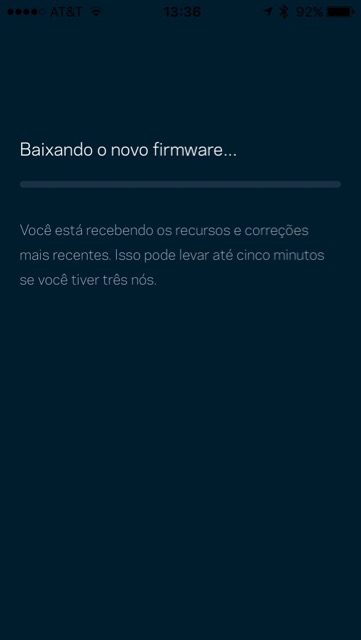
Several steps (not sure if these are the right order or not!) -- "Verifying an internet connection"...."Accessing the cloud"..."Success! You configured a node!"..."Sending configurations to the node"...."Configuring your remote access"...


On the very first node -- the one that actually connects to the wired broadband network...there was a failure -- a sad cloud face...I ended up resetting the node and going through the process again.


After setting up both nodes, it told me there was a firmware update, so I let it download it.


It gives you some instruction on where to position the nodes -- where you want coverage, but within reach of the first node. It's NOT personal to your situation, but just suggestions.


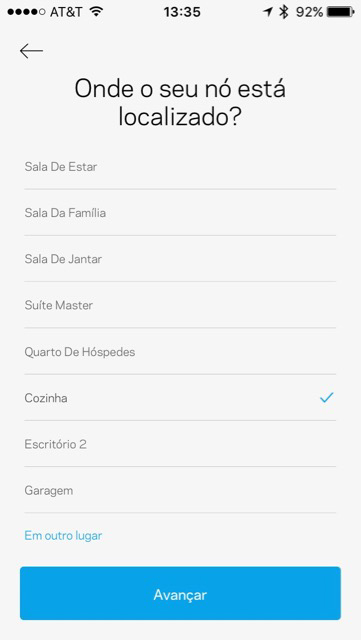
You pick the location of the node -- and that is how it is referred to in the application from then on. In this case, it was the node in the kitchen (cozinha)


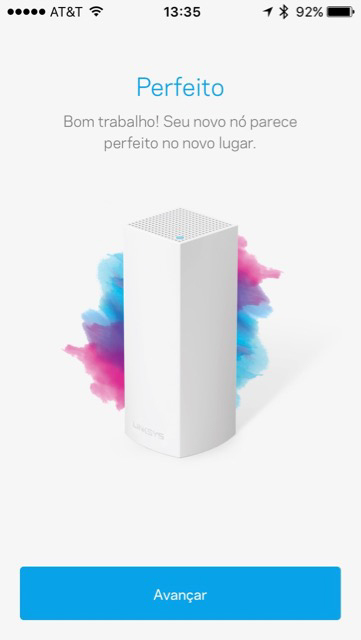
It decided that I had a picked a good spot for node 2 --


Your WIFI is ready. The configuration was finished.


I am still testing whether this is better or not. I noticed my Macbook getting hot when I was sitting on the porch (sign of weak connection), so I used the 'device prioritization' to make it one of the top devices. It has cooled off. Not sure if that had anything to do with it or not.

It was an easy setup...although it took a few minutes....I'll keep an eye on it and post an update to this article in a few days.

karmicdragonfly: (Default)
I had a really nice night the other night with friends. We attended an event at a local bar to celebrate 'Negroni Week', where you bought a ticket which entitled you to 4 Negronis. They were not small -- maybe not full size, but definitely good sized drinks!

It was a fun night!


Taking pics of the moon the other night -
O sol nasce pra todos, a lua pra quem merece.


I just subscribed to Photoshop's free trial...but they only gave me 7 days when I used to be 30...I do not ever plan to subscribe long term to their software -- I only needed it for a class...it makes me think I should transition away from my old standalone version of Lightroom, so I'm not using Adobe products. Plenty of options for what I need -- Pixelmator, Gimp...and what did I see the other day 'Affinity'?
karmicdragonfly: (Default)
After Republicans in House and Senate voted to allow ISPs to sell your personal browsing history (and I imagine that Jabba will sign the bill), I began to look at how I could surf using a VPN -- to protect my browsing history.

I have no desire to share browsing history with advertisers -- do they really need to know about that personal 'thing' I might have had, lol? And how exactly would advertisers make use of my interest in Old French to sell me something?

It already annoys me when I look at, say, underwear online, only to see that same underwear offered as an ad in a website. Not only is it intrusive, it's the VERY SAME FRICKEN UNDERWEAR that I just looked at! I didn't buy it the first time -- why would I want to see it again???

As I get older, I have less need to buy shit. (I also am cursing more.) And I have no need for advertisers to come find me -- i'll find them when I need something!

Anyways...I digress...

Opera comes with a free built in VPN. I figure 'free' means maybe not as robust as it could be. But free is always good, and it probably serves my purpose. So, I have switched to Opera!

profile

karmicdragonfly: (Default)
karmicdragonfly

December 2025

M T W T F S S
1234567
8910111213 14
151617181920 21
22232425262728
293031    

most popular tags

...

"O seguro morreu de velho, mas o desconfiado ainda está vivo." -- "The safe one died of old age, but the suspicious one is still living."